Rubric Scales
Last updated: October 1, 2026
Summary
Rubric Scales are used to quantitatively rate or appreciate a learner's progress on their Goals via Progress Reviews.
How to create a Rubric Scale?
Super Admins and Power Users with the 'Organization-wide Scaffold Creator' ability can manage Rubric Scales in the Scaffolds tab. If you don't already have these permissions, you can request them from an administrator. See 📄 Super Admins, Power Users, and Departments.
Each Level in a Rubric Scale has a Name (text), which is shown in the Progress Review (see 📄 Create a Progress Review Request), and additionally has an underlying Percentage. The Levels can be placed in any order and weighted by any percentage.
Note: Each Rubric Scale and all its Levels can be translated into the primary (default) and optionally secondary languages, as set during the installation of Portflow. The language displayed to the user depends on the language set in their profile (inherited from the LMS or set in Portflow User Settings) — see 📄 User Settings. If the user language is not one of the languages the Rubric Scale is translated to, it will default to the default/primary language.
As an Organization-wide scaffold Creator (or Super Admin), you can create and modify a Rubric Scales as follows:
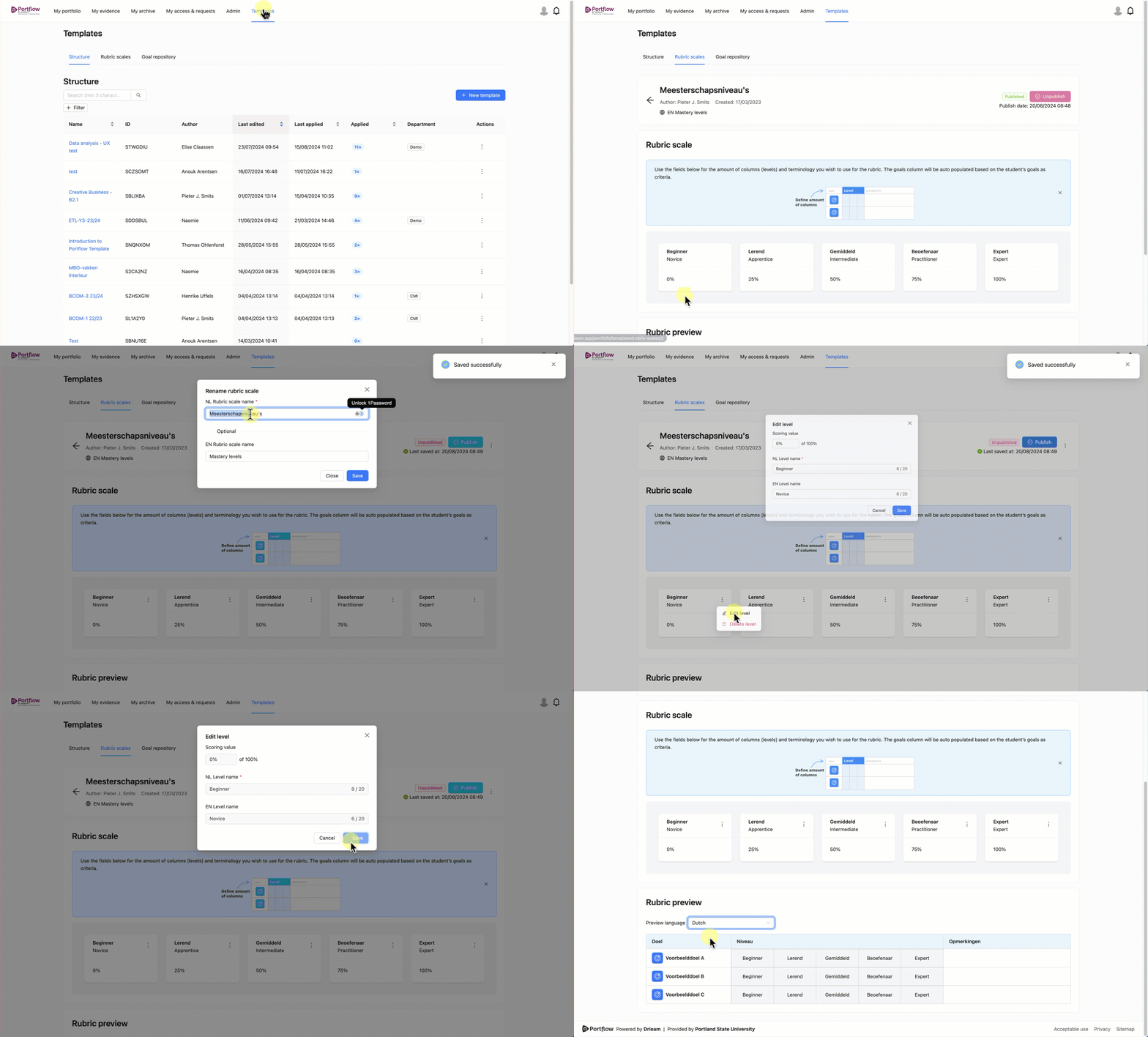
Go to Scaffolds → Rubric scales
Create a new Rubric Scale by clicking + Scale, or open an existing Rubric Scale by clicking its Name and Unpublish it to modify it.
Via the Action menu (︙) → Rename next to the 'Publish' button, you can change the names of the Scale in all applicable languages.
Via the Action menu (︙) on the Level cards, you can change the name of the levels in all languages. You can also change the underlying percentage.
In the Preview, you can see what the Rubric Scale will look like in the Progress Review.
Note: When a learner has picked a Scale for a Progress Review Request, all levels from that Scale as well as the related underlying percentages (%) will be copied over to that Progress Review Request. This ensures that future changes of Rubric Scale Levels have no impact on already started and completed Progress Reviews.
How do you make good use of Rubric Scales as an institution?
Rubric Scales are used to quantitatively appreciate progress of learners in Progress Reviews. Different Rubric Scales may be used to value progress on the same Goal. This happens e.g. when a learner has chosen a different Rubric Scale on different Progress Reviews on the same Goal.
How do you ensure that the Growth Chart associated with a Goal, and the Spider Diagram that contains multiple Goals and Progress Review scores, still provide useful insights?
The Rules
Rule 1: Make sure that a level that generates a certain 'feeling' in different Rubric Scales also has the same percentage. For example, 'Satisfactory' in one Rubric Scale should have a similar underlying percentage as ':)' in another Rubric Scale (e.g. both 60%). It is not recommended to create multiple scales in which the same word (e.g. 'sufficient') appears, but actually means something different.
Rule 2: These Scales don't necessarily need to correspond to what you consider to be 'sufficient' during your formal summative assessment: the Progress Review ratings in Portflow represent growth rather than absolute or summative 'marks'. Some programmes only see an 8 to be a pass in formal assessment, whilst others consider a 5.5 to be sufficient. In order to use Rubric Scales and combine them across the whole institution, it is important to adopt a consistent approach, separate from the marks awarded in formal assessments. The mark can be entered in the LMS or the assessment system.
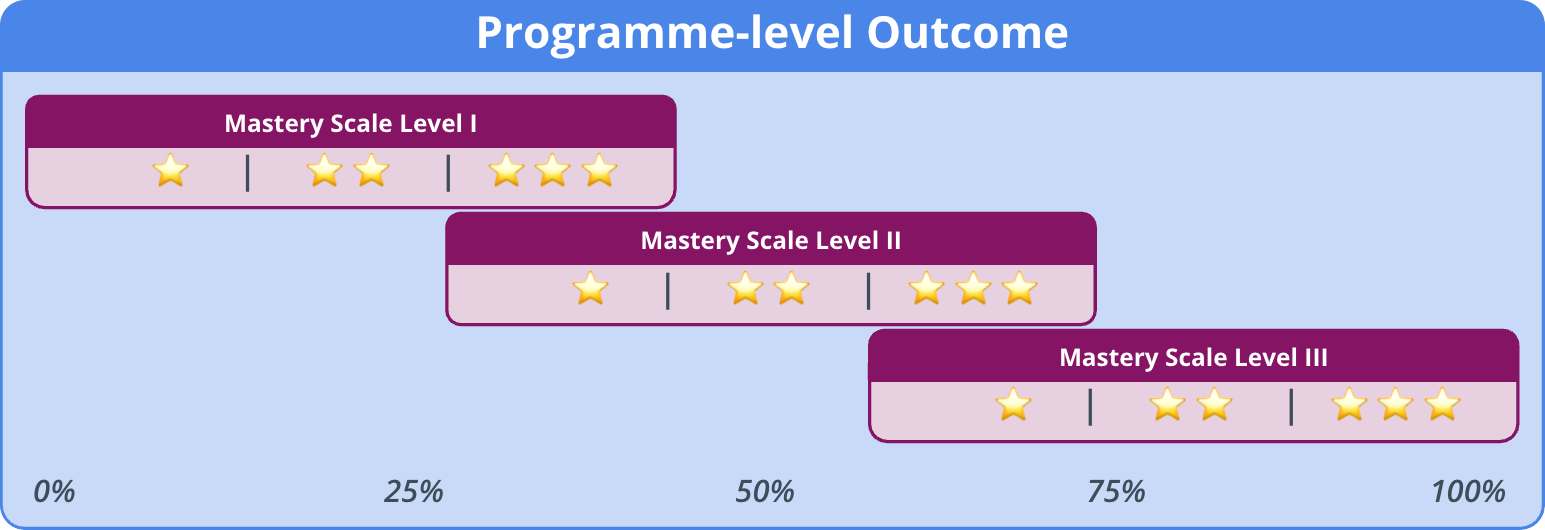
Rule 3: The Scales do not all have to start or end at the same percentage, or increase proportionally. For example: you can overlap the scales (Y1: 0-50%, Y2: 30-80%, Y3: 50-100%). Or you can centre the levels on specific numbers (0-40-55-70-100%).
Rule 4: As the Scales can be used throughout the institution, give the levels a generic name. Then make a translation key, either in communication materials or through level descriptions: 📄 Goal Repository & Goal Sets
From these rules, for example, the following Rubric Scales could follow:



These Rubric Scales can be used interchangeably by a learner because the percentages are used for the growth charts.
How do Rubric Scale percentages end up in Portflow visualisations?
We'll take the example of these completed reviews:
First review on 'Goal 1', at time point 1
Teacher 1: 60%
Teacher 2: 80%
Second review on 'Goal 1', at time point 2
Teacher 1: 70%
Teacher 2: 90%
Growth Chart
In the Growth Chart (per Goal), the average rating (in percentages) per role per review is taken as a data point. A line is drawn between the different points at different times.
Example: In the growth chart of 'Goal 1', we now see two data points. The data points are the average per role (teachers): 70% (60+80/2) at time point 1 and 80% (70+90/2) at time point 2.
Spider Diagram
Results in the Spider Diagram (multiple goals, aggregated from multiple Progress Reviews) are based on a weighted average: the last rating weighs 65% and the average of the previous results weighs 35%. The rating (in percentage) of the same role is averaged.
Example: In the Spider Diagram after the first review is conducted, we now see 70% for 'goal 1'. After the second review is conducted, we see 76.5% for 'goal 1' (calculation of the weighted average: )
Progress Review Results
Results in a Spider Diagram of one Progress Review (multiple goals, 1 Progress Review) are averaged per role.
Example: In the Progress review diagrams, we see the average score per role (teachers): 70% in the diagram for evaluation 1 and 80% in the diagram for evaluation 2.