View Usage Statistics
Last updated: July 29, 2026
Summary
Portflow provides various insights for Admins regarding the current and historic usage of Portflow.
As an Admin, you can find general statistics via the Admin panel in the Portflow user interface. Additional and historic statistics can be obtained via the Portflow public API.
General Statistics
As a Super Admin or as a Power User with the permission 'Data Manager' or 'Functional Manager' (see 📄 Super Admins, Power Users, and Departments), you can access the Statistics tab (1) in the Portflow admin panel.
In this tab, you'll find general overall usage statistics that are calculated up to now (either nightly or live — based on the top-right button choice).
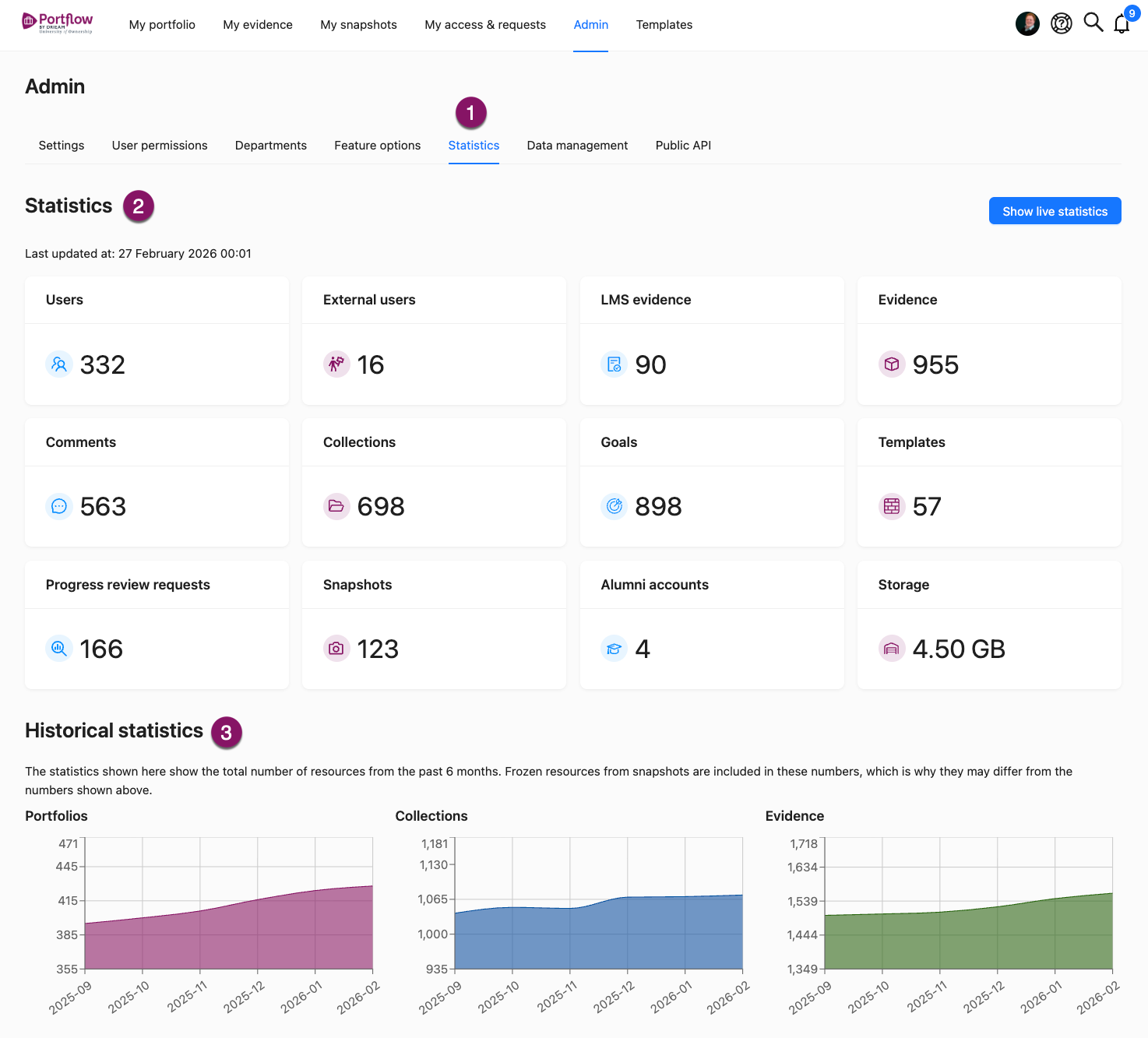
Statistics (2)
Users: The total number of users who have launched Portflow from the LMS at least once and have not been deleted (see 📄 Archiving and Deleting User Data).
External users: The total number of currently existing external users (see 📄 Share With Externals).
LMS evidence: The total number of Evidences that has been imported from Canvas or Brightspace assignments (see 📄 Import LMS Assignment as Evidence).
Evidence: The total number of Evidences (excluding LMS Evidence) that has been added to Portfolios.
Comments: The total number of Comments (Feedback), including Feedback Requests) that have been created on Evidence and Collections.
Collections: The total number of Collections that are created in or imported to learner Portfolios.
Goals: The total number of Goals that are created in or imported to learner Portfolios.
Templates: The total number of Templates that are created and have not been deleted.
Progress review requests: The total number of created Progress Review Requests.
Snapshots: The total number of created Portfolio Snapshots (see 📄 Create a Snapshot (Freeze a Portfolio)).
Alumni accounts: The total number of current alumni accounts (see 📄 Alumni Access to Portflow) (i.e. users that have a linked alumni account).
Storage: The total storage used by all users.
Historical statistics (3)
For three key components (Portfolios, Collections, Evidence) the development over the last 6 months is visualised in graphs. These statistics include all data that is also included in Snapshots, and therefore might be different from the numbers above.
Advanced statistics
Additional statistics can be obtained using the comprehensive Portflow public API (see developer.portflow.app). This includes i.a. user actions (creation and deletion of Evidence, Evidence Versions, Collections, Goals, Sub-Goals, Activities, Comments, Progress Review Requests, Templates, Template Imports, Portfolio Exports), Progress Review Results (see 📄 Manage API Applications).
Moreover, the Portflow API provides historical data on all the mentioned statistics available in the Portflow UI.