Add Video as Evidence
Last updated: October 13, 2026
Summary
Portflow offers several ways to add Video Evidence to your Portfolio. We recommend uploading Video Evidence to a dedicated video hosting platform for the best quality, compatibility, and playback capabilities. Hosted videos can be embedded in Portflow as Evidence.
How to embed video from a video hosting platform?
As a learner, you can embed videos hosted on various prevalent video hosting platforms as Evidence. You can add embedded Video Evidence from any page where you can add Evidence, such as the Collection page, the Goal Card or the 'My Evidence' page.
Supported video hosting platforms
Portflow supports embedding videos from the following video hosting platforms:
Vimeo
YouTube
Canvas Studio
Kaltura
Panopto
Yuja
Custom video provider domains (e.g. Mediasite, Switch Tube)
A Portflow Admin can manage video platforms in 📄 Feature options
Note: Videos need to be at least publicly available via an embed URL or code to be included in the portfolio. Please refer to platform-specific recommendations to learn more about the link generation to embed videos.
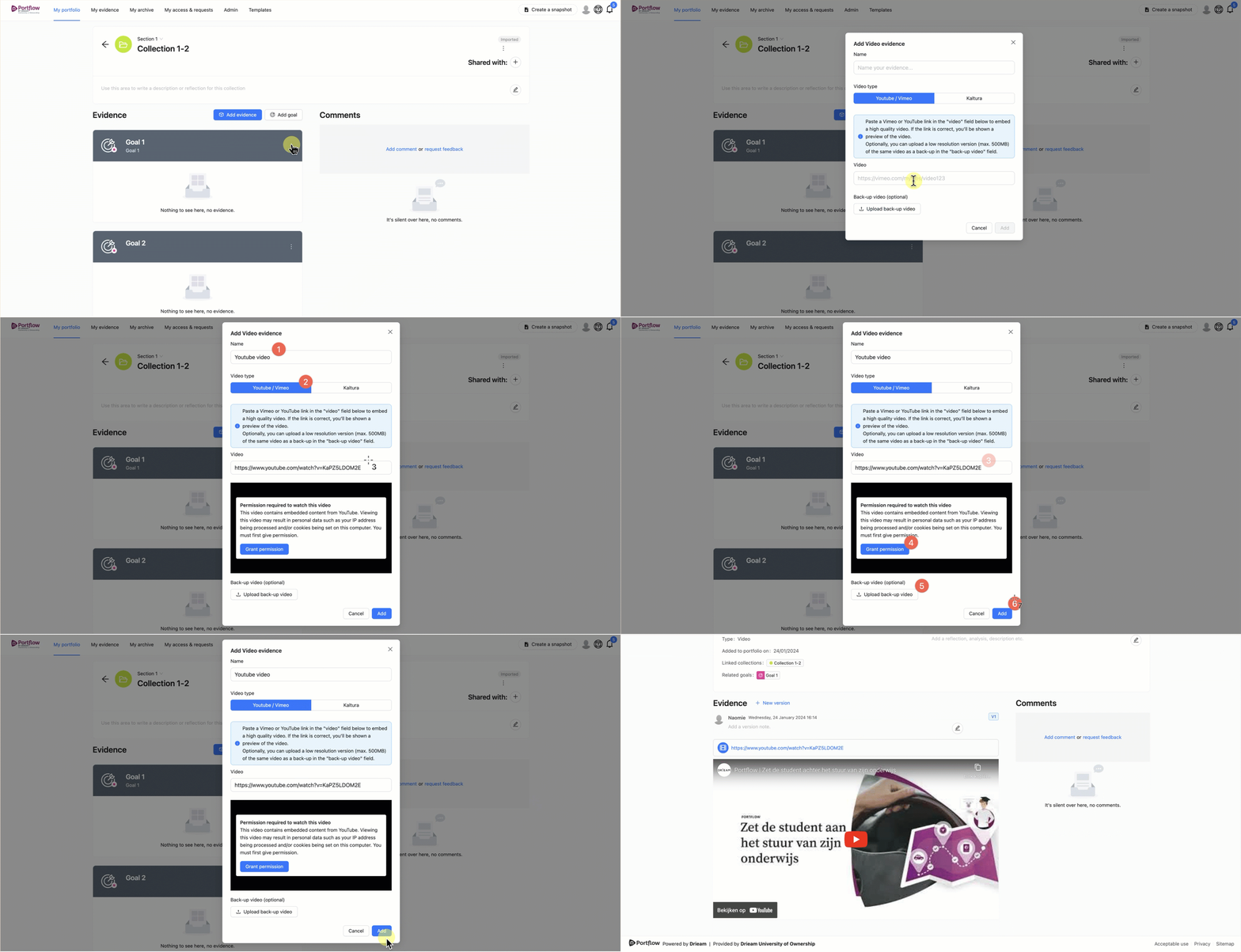
Click + Add evidence or the button with a plus and a cube icon (+☐).
Select Embed video and choose the video platform.
Paste the link or embed code to your video.
Grant Portflow permission to view the video.
Upload a lower quality back-up video (recommended).
This back-up file will remain available in the Portfolio for auditability in case the hosted video is no longer available.
Click Add to create the Video Evidence.
Upload video file as Evidence
It is also possible to directly upload a video file as evidence to Portflow, instead of an embedded video as explained above. See 📄 Upload Files as Evidence.
Note:
Each combination of browser and operating system offers a different set of supported media types that can be played back in Portflow. Therefore, a particular file type of a video may not be playable in your browser on your operating system. In that case, the file can be downloaded and played in a local video player.
Video files that are supported by most browsers: MP4 and WebM
Video files that are supported by some browsers: MOV, AVI, WMV