Delete Evidence & Trash Bin
Last updated: July 29, 2026
Summary
Evidence can be unlinked (removed) from a Collection, Goal or Sub-Goal or deleted from the entire Portfolio. After deletion, Evidence and Evidence versions are retained in the Trash Bin for 90 days, from where they can be restored by the learner.
How to remove Evidence from a Collection?
Evidence can be removed (unlinked) from a Collection in several ways:
On the relevant Collection page
Click the Action menu (︙) on the Evidence card.
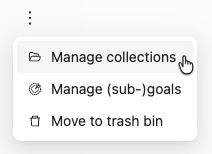
Click Manage Collections.
On the Evidence page of this Evidence
Click the Action menu (︙) next to the title of the Evidence
Click Manage Collections.
On the 'My evidence' page
Click the Action menu (︙) on the row of the Evidence
Click Manage Collections.
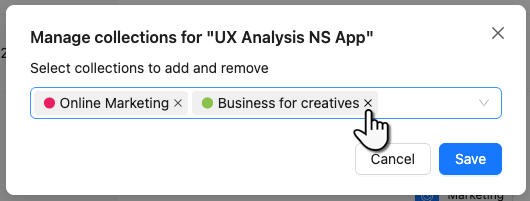
Click the cross (╳) next to the Collection(s) from which you want to remove the Evidence.
How to remove Evidence from a Goal or Sub-Goal?
On the 'My evidence' page, you can see to which Goal(s) and Sub-Goal(s) the Evidence is linked to, or go to the page of the Evidence itself. You can detach/remove/unlink Evidence from a Goal or Sub-Goal in 4 ways:
Via the Goal card of the corresponding Goal.
Open the Goal card
Go to the tab Evidence
In the Evidence row, click the Action menu (︙)
Click Remove evidence from goal
Via My evidence
Go to the 'My evidence' page
Click the Action menu (︙) on the row of the Evidence
Click Manage (sub-)goals
Remove the Goal(s) and Sub-Goals with the cross (╳)
Via the Evidence page of the Evidence
Open the page of the Evidence
Click the Action menu (︙) next to the title of the Evidence
Click Manage (sub-)goals
Remove the Goal(s) and Sub-Goals with the cross (╳)
Via the Collection page
Open the Collection page that contains the Evidence
Click the Action menu (︙) on the Evidence card
Click Manage (sub-)goals
Remove the Goal(s) and Sub-Goals with the cross (╳)
How to delete Evidence from your Portfolio?
Via the 'My evidence' page, a piece of Evidence can be completely deleted (removed) from the Portfolio. It will be kept in the Trash bin for 90 days. The Trash bin is only accessible by the Portfolio owner.
Go to the 'My evidence' page.
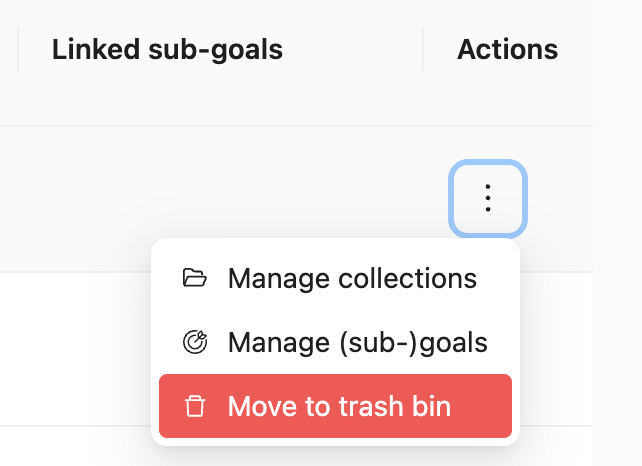
Click the Action menu (︙) on the row of the Evidence.
Click Move to trash bin.
Confirm the action by clicking Move to trash bin again.
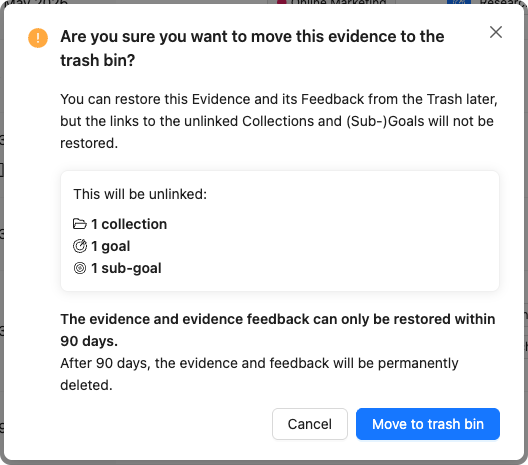
Note! If you delete Evidence from Portflow, you also delete the Description, all received Feedback, and all relations with components such as Activities, Collections, or Goals. Restoring it from the Trash bin restores the Evidence and its Feedback, but it does not restore relations to other components.
How to delete an Evidence Version?
As a learner, you can delete Versions of Evidence by opening the corresponding Version and following the following steps:
Click on the Action menu (︙) next to the Version to be removed
Click Move to trash bin
Confirm the action.

How to restore deleted Evidence or Versions from the Trash bin?
Deleted Evidence or deleted Versions can be restored (retrieved) from the Trash bin for up to 90 days after which they will be permanently deleted from Portflow. To restore Evidence or a Version, follow these steps:
Open the User menu by clicking your avatar in the top right.
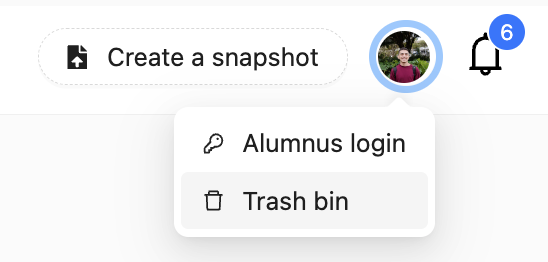
Click Trash bin.
Click the Restore button (↺) in the 'Actions' column on the row of the Evidence or Version.