Upload Files as Evidence
Last updated: July 28, 2026
Summary
Learners can upload one or more files from their computer, or from Microsoft OneDrive/SharePoint to their Portfolio as Evidence. This can be virtually any type of file. Most common file types can directly be previewed within Portflow, without the need to download them first.
How to upload files as Evidence?
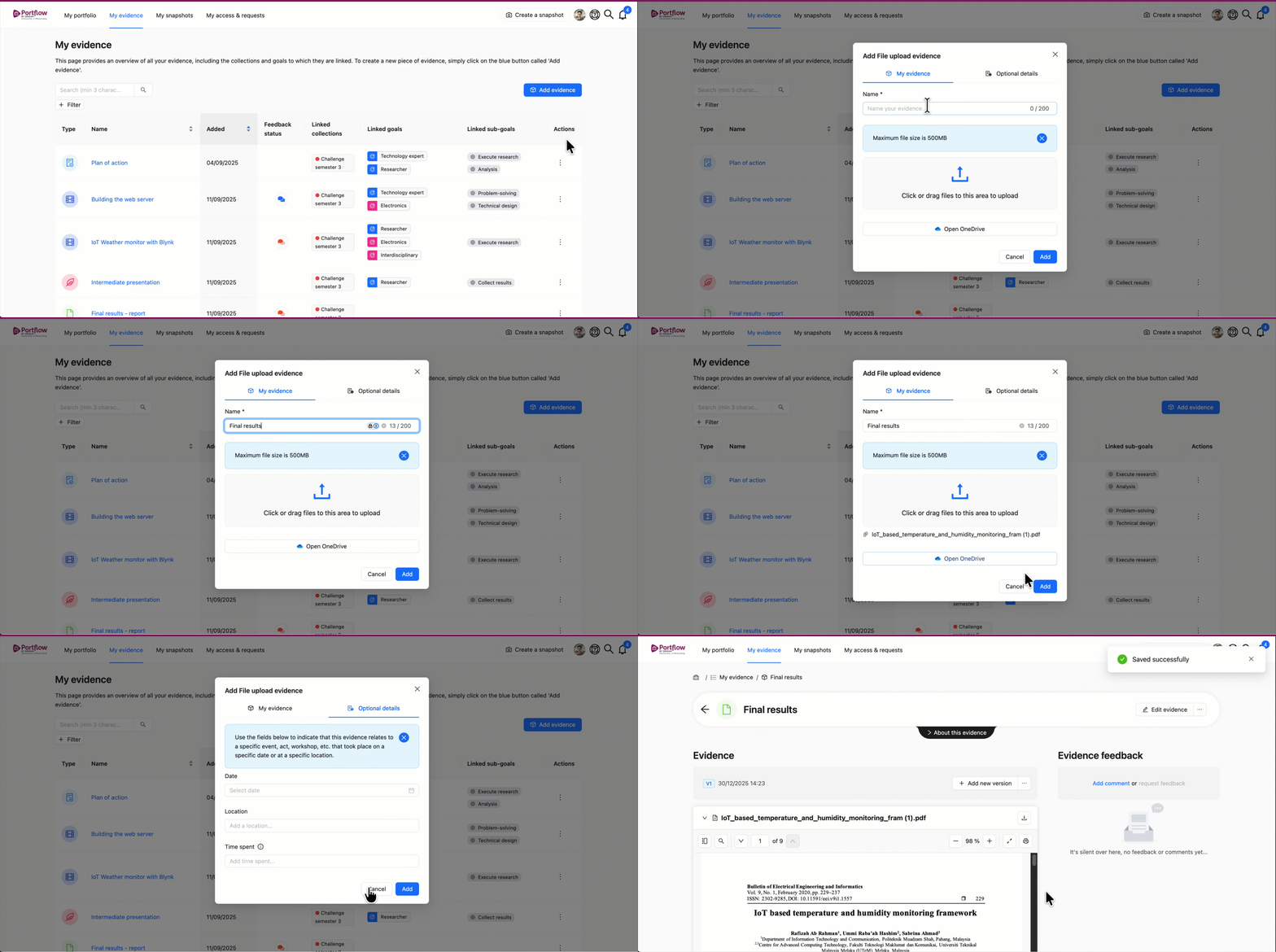
As a learner, you can directly upload files as Evidence from your computer, or directly import files from any Microsoft OneDrive or SharePoint environment. You can choose to upload files as Evidence on any page where you can add Evidence, such as the Collection page, the Goal Card or the 'My Evidence' page.
Click + Add evidence or the button with a plus and a cube icon (+☐).
Select File upload
Give your evidence a name (you can change this later)
Choose one or more files to upload from your computer or click Open OneDrive to sign in and access a Microsoft OneDrive or SharePoint environment.
Click Add
Tip:
Files such as .docx and .doc are converted to PDF for previewing in Portflow. Because of this, sometimes the formatting is slightly different than intended. This can impact the lay-out of e.g. content sections, literature list or references. If formatting is important, it is best to upload a PDF file.
Even though the uploaded file may look different in the preview in Portflow, the visitor can still download and open the original file to view it in its intended state.
Note:
There is a maximum file size of 500 MB per file to upload, but it is strictly advised to compress media files before uploading them.
Note:
For security reasons, some file types may not be added to Portflow. These file types may present potential security issues.
The following file types are not allowed. This list is not exhaustive.
.ade, .adp, .apk, .appx, .appxbundle, .bat, .cab, .chm, .cmd, .com, .cpl, .dll, .dmg, .ex, .ex_, .exe, .hta, .ins, .isp, .iso, .jar, .js, .jse, .lib, .lnk, .mde, .msc, .msi, .msix, .msixbundle, .msp, .mst, .nsh, .pif, .pptm, .ps1, .scr, .sct, .shb, .sys, .vb, .vbe, .vbs, .vxd, .wsc, .wsf, .wsh, .xlsm