Evidence Versions
Last updated: July 28, 2026
Summary
Learners can create multiple Versions of Evidence to make their iterative learning process visible in Portflow. This helps in reflective practice and helps to ensure authentic work. Feedback dialogues are automatically labelled with the corresponding Version number.
How to add a new Version?
Learners can add up to 100 versions for each Evidence on the Evidence page, by clicking the + New Version button.
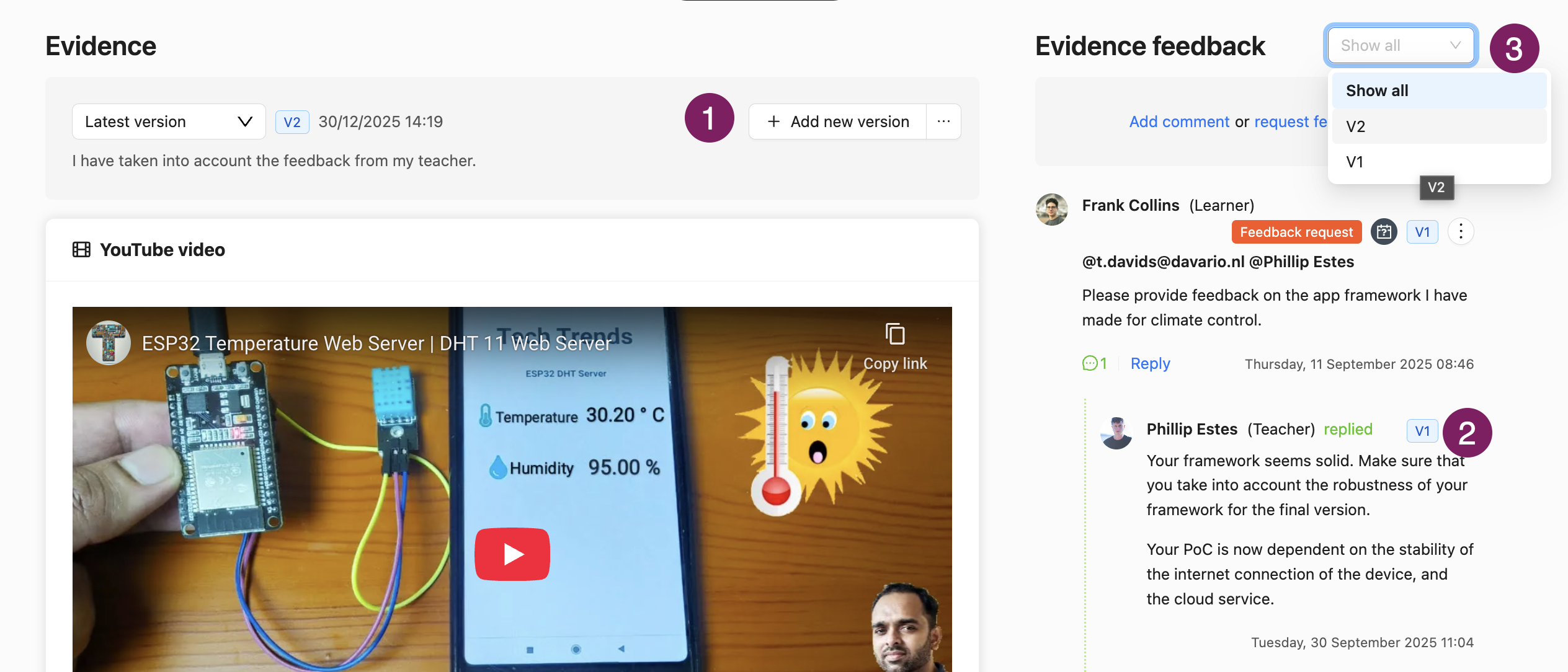
As a learner, open the Evidence and click + New version (1)
Choose the type for your new Version. This can be the same type as the current version or a different type.
Provide the artifacts for the new Version. If you have selected ‘File upload’, you can reuse relevant files from the previous Version if desired.
Add a brief description of what has changed and how you processed feedback in this new version in the Version note (optional).
Click Add.
Note: If you wish to no longer show a specific earlier Version, you could remove this Version. However, this will also delete all related Feedback. See 📄 Deleting/Unlinking Evidence & Trash Bin.
We recommend not to delete Evidence Versions to maintain the value of a full and authentic record of your iterative learning process.
Feedback and Versions
Feedback received by the user on the various Evidence Versions is automatically labelled with the Version number on which the Feedback was given (2). The dropdown menu next to 'Evidence feedback' allows the user to filter the Feedback for only a specific Version (3).
Note: Feedback can only be requested/posted on the latest Version of the Evidence.