Link Feedback to Goals
Last updated: October 8, 2026
Summary
All Feedback related to a Goal is aggregated and collected in the Goal Card, on the Feedback tab. Learners can link received Feedback to a Goal or Sub-Goal and specific Goal-directed Feedback is automatically added to the aggregated Feedback overview per Goal.
What is the Feedback tab in the Goal Card?
All Feedback related to a Goal is aggregated and collected in the Goal Card, on the Feedback tab. The Feedback tab provides a chronological overview of all Feedback related to that Goal and its Sub-Goals. Narrative feedback from Progress Reviews is automatically added to the overview. Feedback provided at the Evidence or Collection level can also be added to the Feedback tab.
How to link Feedback to a Goal?
As a learner, you can manually link received Feedback to a Goals and Sub-Goals. If you have requested Goal-specific Feedback in your Feedback Request (see 📄 Request and Provide Feedback), the Feedback will immediately show in the Feedback tab of the Goal card. To manually linked other Feedback to a Goal, follow these steps:
Go to the Feedback that you want to link.
Click Goal icon (target with arrow) next to a Feedback Comment to Link to goal(s) or sub-goal(s).
Select the relevant Goal(s) or Sub-Goal(s), AND/OR use the AI Goal suggestions
AI suggestions are a beta functionality that might not be available to you. Enable the feature (if available) in your📄 User Settings
You can add the Feedback to multiple Goals or Sub-Goals.
Optionally, select a part of the Feedback you want to highlight.
Click the highlight icon (marker) to highlight the selection.
Optionally, write a note to explain why you feel this Feedback is relevant to the chosen Goal(s).
Click Save to add the Feedback to the Goal(s).
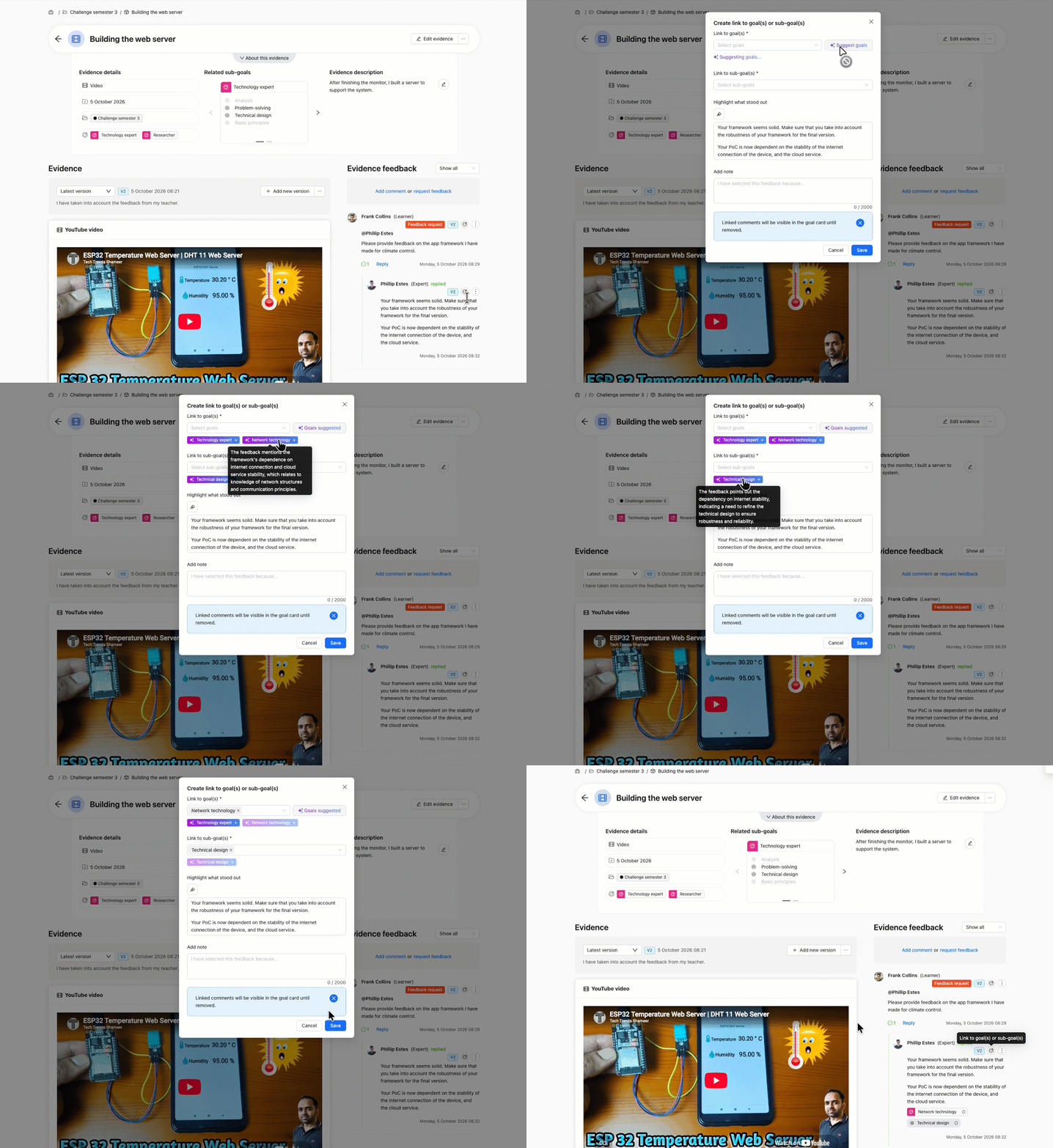
The Feedback (including highlight and note) has now been added to the Feedback tab on the Goal cards of the corresponding Goal(s).
A small Goal tag is shown on the Comment to show which Goal that Feedback Comment is linked to. On this tag, you can click the icon ↻ to relink (update) the Feedback to the Goal, or remove the link.
Tip: If you want to add different pieces of Feedback to different Goals, repeat the process, selecting 1 Goal each time and highlighting only the text relevant to that Goal.
Note: It is also possible to link Feedback received on imported Rubric criteria from LMS assignment imports to Goals (see 📄 Import LMS Assignment as Evidence)